<?xml version="1.0" encoding="utf-8"?> 
<feed xmlns="http://www.w3.org/2005/Atom" xml:lang="en">
    <id>https://thatcat.space/</id>
    <title>that cat space</title>
    <link href="https://thatcat.space/index.xml" rel="self" type="application/atom+xml" />
    <link href="https://thatcat.space/" />
    <subtitle>Eric Kotato&#39;s blog.</subtitle>
    <generator uri="https://gohugo.io/" version="0.135.0">Hugo</generator><updated>2024-05-27T15:35:01+03:00</updated>
    <entry>
            <title type="html"><![CDATA[May 27, 2024 at 15:35]]></title>
            <link href="https://thatcat.space/notes/5/" rel="alternate" type="text/html" /><link href="https://thatcat.space/ru/notes/5/" rel="alternate" type="text/html" hreflang="ru" />
            <published>2024-05-27T15:35:01+03:00</published>
            <updated>2024-05-27T15:35:01+03:00</updated>
            <author>
                <name>Author</name>
            </author>
            <id>https://thatcat.space/notes/5/</id>
            <content type="html"><![CDATA[<p>I haven&rsquo;t touched the site for pretty long time, but recently after re-installing Linux I&rsquo;ve decided to update Hugo to latest version, and&hellip; found out that my site was broken in serveral places.</p>
<ol>
<li>I had to move most of the params in language sections to <code>params</code> sub-section. Actually, <code>hugo serve</code> warns about wrongly placed parameters, so it&rsquo;s not a big problem.</li>
<li>I&rsquo;ve removed <code>taxonomyTerm</code> from the <code>outputs</code> section in config. As I understood, it&rsquo;s all merged with <code>taxonomy</code> now, so separate parameter doesn&rsquo;t make sense.</li>
<li>I had to make category keys in theme to lower case. 0.123.3 has added the <a href="https://gohugo.io/getting-started/configuration/#capitalizelisttitles" target="_blank" rel="noopener noreffer">capitalizeListTitles</a>
 option (i.e. <code>font-patching</code> became <code>Font-Patching</code>). For some people it&rsquo;s conveinent, but for me it broke localization, since it was based on lowercased keys. In truth, making keys lowercased was a rushed decision, because I could just disable an option, but at some point there could be a problem when something somewhere will be in wrong case, and will break everything, so it&rsquo;s for the better.</li>
</ol>
<p>But now everything is generated with fresh Hugo 0.126.1, and works as expected. I think I&rsquo;ll write a theme for Hugo sometime, but I think it won&rsquo;t happen soon.</p>
]]></content>
        </entry>
<entry>
            <title type="html"><![CDATA[Dark window frame on Windows 10]]></title>
            <link href="https://thatcat.space/notes/4/" rel="alternate" type="text/html" /><link href="https://thatcat.space/ru/notes/4/" rel="alternate" type="text/html" hreflang="ru" />
            <published>2023-03-25T23:47:56+03:00</published>
            <updated>2024-02-04T09:28:46+03:00</updated>
            <author>
                <name>Author</name>
            </author>
            <id>https://thatcat.space/notes/4/</id>
            <content type="html"><![CDATA[<p>From time to time I&rsquo;m encountering a problem that app has dark color theme, but window frame is light. So here I&rsquo;ll save two ways to change it on Windows 10.</p>
<h2 id="for-app-users">For app users</h2>
<p>I&rsquo;ll tell you right away: this way won&rsquo;t be useful if the accent color is important to you.</p>
<p>Open Registry Editor and find <code>HKEY_CURRENT_USER\SOFTWARE\Microsoft\Windows\DWM</code> section. You&rsquo;ll need the following parameters from it:</p>
<ul>
<li><code>ColorPrevalence</code>: DWORD = 1<br>
This parameter allows to use accent color as title bar color.</li>
<li><code>AccentColor</code> and <code>AccentColorInactive</code>: DWORD = color in ABGR format (hexadecimal).<br>
Colors for active and inactive mode.</li>
</ul>
<p>Here&rsquo;s an example of registry file where color <code>#000000</code> is used for active window title and <code>#212121</code> is used for inactive one:</p>
<pre>Windows Registry Editor Version 5.00

[HKEY_CURRENT_USER\SOFTWARE\Microsoft\Windows\DWM]
&#34;ColorPrevalence&#34;=dword:00000001
&#34;AccentColor&#34;=dword:ff000000
&#34;AccentColorInactive&#34;=dword:ff212121</pre><h2 id="for-app-coders">For app coders</h2>
<p>You&rsquo;ll need <a href="https://learn.microsoft.com/en-us/windows/win32/api/dwmapi/nf-dwmapi-dwmsetwindowattribute" target="_blank" rel="noopener noreffer">DwmSetWindowAttribute</a>
 function:</p>
<pre>HRESULT DwmSetWindowAttribute(
       HWND    hwnd,        // window
       DWORD   dwAttribute, // attribute itself
  [in] LPCVOID pvAttribute, // value
       DWORD   cbAttribute  // value size in bytes
);</pre><p>Attribute values are described by <a href="https://learn.microsoft.com/en-us/windows/win32/api/dwmapi/ne-dwmapi-dwmwindowattribute" target="_blank" rel="noopener noreffer">DWMWINDOWATTRIBUTE</a>
 but we specifically interested in <code>DWMWA_USE_IMMERSIVE_DARK_MODE</code>. Documentation says it&rsquo;s equal to <code>20</code>, however until 20H1 version <a href="https://stackoverflow.com/a/62811758" target="_blank" rel="noopener noreffer">the value has been equal to <code>19</code></a>
.</p>
<p>That&rsquo;s how i&rsquo;ve tried to implement <a href="https://github.com/ultimatepp/ultimatepp/pull/77" target="_blank" rel="noopener noreffer">autodetect of window frame theme in Ultimate++</a>
:</p>
<pre>  HRESULT (WINAPI *DwmSetWindowAttribute)(HWND hwnd, DWORD dwAttribute, LPCVOID pvAttribute, DWORD cbAttribute);
  DllFn(DwmSetWindowAttribute, &#34;dwmapi.dll&#34;, &#34;DwmSetWindowAttribute&#34;);
  if (DwmSetWindowAttribute) {
    BOOL useDarkTheme = IsDarkTheme(); 
    DwmSetWindowAttribute(
      top-&gt;hwnd, 20, /* 20 is DWMWINDOWATTRIBUTE::DWMWA_USE_IMMERSIVE_DARK_MODE */
      &amp;useDarkTheme, sizeof(useDarkTheme));
  }</pre>]]></content>
        </entry>
<entry>
            <title type="html"><![CDATA[March 11, 2023 at 03:11]]></title>
            <link href="https://thatcat.space/notes/3/" rel="alternate" type="text/html" /><link href="https://thatcat.space/ru/notes/3/" rel="alternate" type="text/html" hreflang="ru" />
            <published>2023-03-11T03:11:07+03:00</published>
            <updated>2024-02-04T09:28:46+03:00</updated>
            <author>
                <name>Author</name>
            </author>
            <id>https://thatcat.space/notes/3/</id>
            <content type="html"><![CDATA[<p>Notes are now shown on home page. At the same time I&rsquo;ve finished localizations moments and converted RSS to Atom. Moreover, I&rsquo;ve fixed Atom XML file the way it now shows all content as it should look as far as it possible.</p>
<p>It seems that only thing left to me is to make yourself an editor or at least button to add/update posts. Still, it&rsquo;s not convenient to do it through SFTP. Time and date are written manually as well.</p>
<p>Probably this is what&rsquo;s stopping me to write here frequently, so when I&rsquo;m starting to write, the posts become longer than I expect.</p>
<p>But with notes probably blog will be more lively. Articles won&rsquo;t go anywhere though, you can subscribe to them by RSS separately. Or only to notes. Or to notes with tag.</p>
<p>I&rsquo;m also thinking to make something for small posts, like self-hosting some ActivityPub server. In that case though it will be a small server, because there is not much RAM on this VPS. But that&rsquo;s under question.</p>
]]></content>
        </entry>
<entry>
            <title type="html"><![CDATA[March 10, 2023 at 05:24]]></title>
            <link href="https://thatcat.space/notes/2/" rel="alternate" type="text/html" /><link href="https://thatcat.space/ru/notes/2/" rel="alternate" type="text/html" hreflang="ru" />
            <published>2023-03-10T05:24:45+03:00</published>
            <updated>2024-02-04T09:28:46+03:00</updated>
            <author>
                <name>Author</name>
            </author>
            <id>https://thatcat.space/notes/2/</id>
            <content type="html"><![CDATA[<p>Since I&rsquo;ve started localization talk, this note will be devoted to localization. To be honest, I&rsquo;m not sure since what version this happened, but localization in Hugo has greatly stepped forward.</p>
<p>First, Hugo now natively supports plurals for many languages. All thanks to <a href="https://github.com/gohugoio/go-i18n" target="_blank" rel="noopener noreffer">https://github.com/gohugoio/go-i18n</a>
 module (fork of <a href="https://github.com/nicksnyder/go-i18n" target="_blank" rel="noopener noreffer">https://github.com/nicksnyder/go-i18n</a>
 ). Usage is very simple: create reqired keys in localization file and translate them. Here&rsquo;s current list for reference (with two-letter language codes): <a href="https://github.com/gohugoio/go-i18n/blob/main/v2/internal/plural/codegen/plurals.xml" target="_blank" rel="noopener noreffer">https://github.com/gohugoio/go-i18n/blob/main/v2/internal/plural/codegen/plurals.xml</a>
</p>
<p>Second, Hugo can now localize dates through <code>time.Format DATE_FORMAT DATE</code>. I&rsquo;ve rewritten templates a little, and now places with dates from these:</p>
<pre>{{- with .Site.Params.dateformat | default &#34;2006-01-02&#34; | .PublishDate.Format -}}</pre><p>became these:</p>
<pre>{{- with time.Format (.Site.Params.dateformat | default &#34;2006-01-02&#34;) .PublishDate -}}</pre><p>Category and meta tags localization I had to done on my own. They may not fully work with new section though, but I&rsquo;ll fix it sometime.</p>
]]></content>
        </entry>
<entry>
            <title type="html"><![CDATA[March 10, 2023 at 04:58]]></title>
            <link href="https://thatcat.space/notes/1/" rel="alternate" type="text/html" /><link href="https://thatcat.space/ru/notes/1/" rel="alternate" type="text/html" hreflang="ru" />
            <published>2023-03-10T04:58:39+03:00</published>
            <updated>2024-02-04T09:28:46+03:00</updated>
            <author>
                <name>Author</name>
            </author>
            <id>https://thatcat.space/notes/1/</id>
            <content type="html"><![CDATA[<p>I&rsquo;ve updated the site a little: fixed some theme and localization stuff. Also, as you can see, I&rsquo;ve made a new section: notes.</p>
<p>What is it like? It&rsquo;s something like my own simple microblog without any backend. It&rsquo;s easier for me to make some small notes than to write full articles, and it suites these cases very well.</p>
<p>Of course the deployment like this affects social part, but I can duplicate posts somewhere if necessary. This way, there is the RSS feed (this button from top right), so you can subscribe in any RSS reader that is convenient to you.</p>
]]></content>
        </entry>
<entry>
            <title type="html"><![CDATA[Russian Griftlands font]]></title>
            <link href="https://thatcat.space/posts/griftlands-ru-font/" rel="alternate" type="text/html" /><link href="https://thatcat.space/ru/posts/griftlands-ru-font/" rel="alternate" type="text/html" hreflang="ru" />
            <published>2021-05-08T03:50:00+03:00</published>
            <updated>2024-02-04T09:28:46+03:00</updated>
            <author>
                <name>Author</name>
            </author>
            <id>https://thatcat.space/posts/griftlands-ru-font/</id>
            <content type="html"><![CDATA[<blockquote>
        <p><b>Note</b></p>Russian translation of Griftlands wasn&rsquo;t complete when I wrote the article. But like I thought, font wasn&rsquo;t fixed, so the article is still relevant.</blockquote>
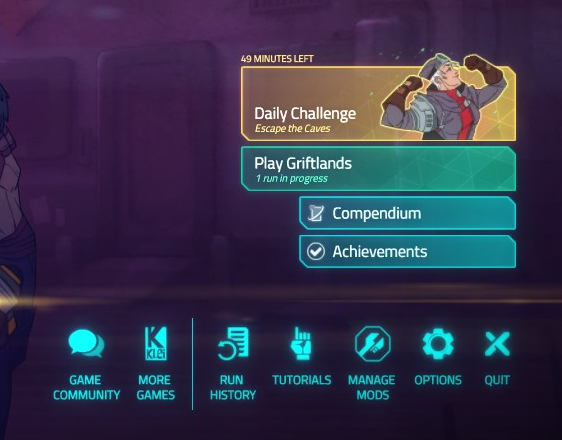
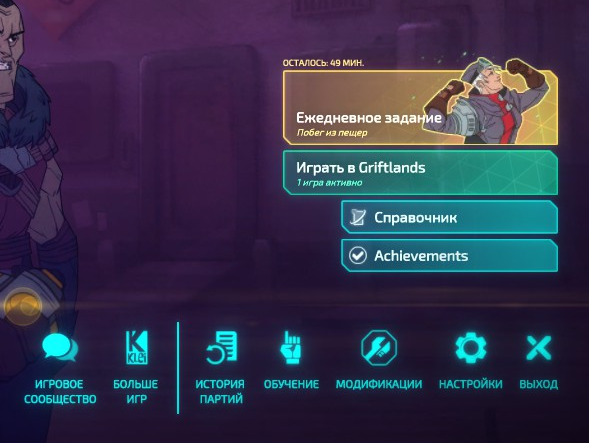
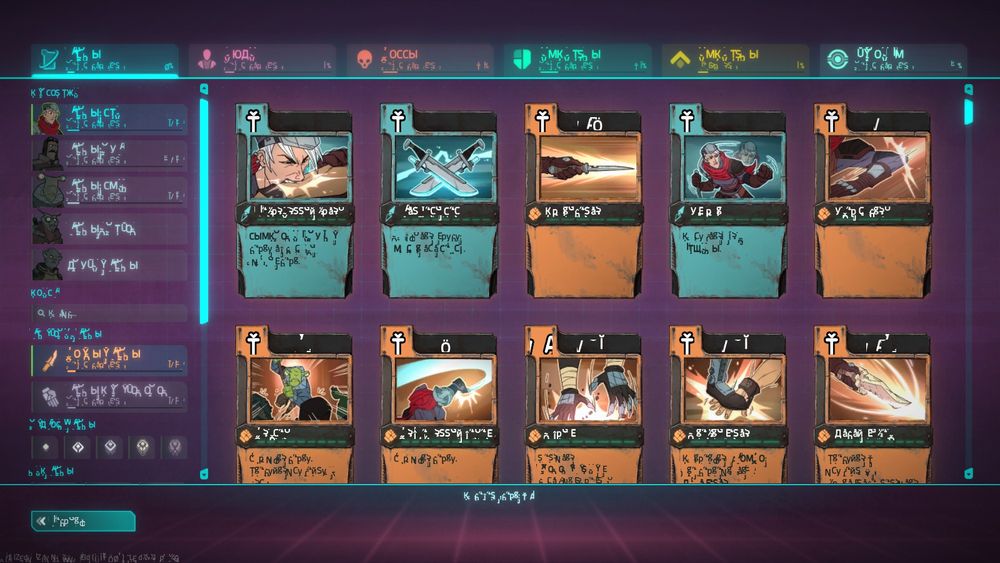
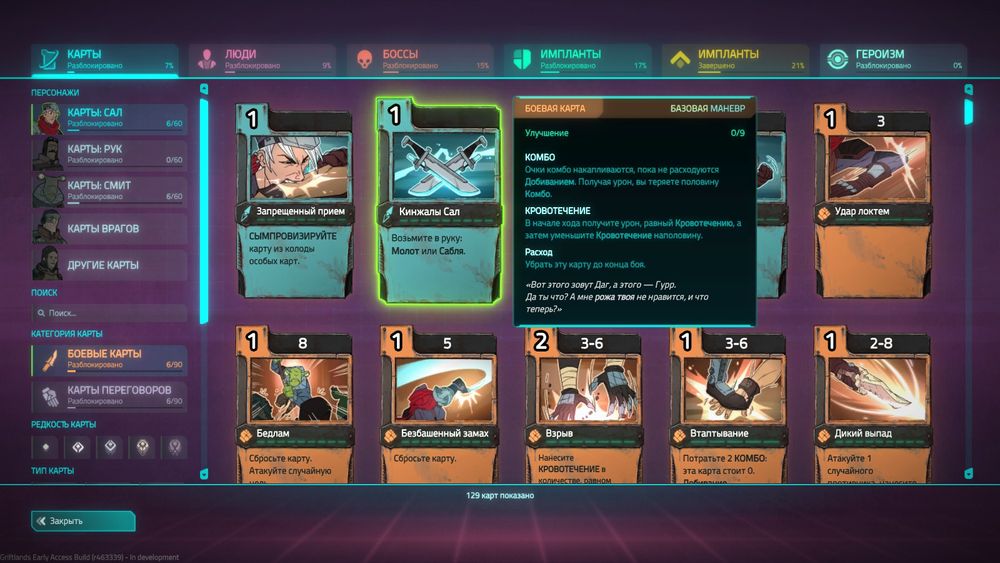
<p>Even though there was a similiar font picked in Russian translation, it&rsquo;s notably differs from original.</p>
<figure><a href="https://thatcat.space/posts/griftlands-ru-font/default-font.png" title="https://thatcat.space/posts/griftlands-ru-font/default-font.png" >
        <img src="https://thatcat.space/posts/griftlands-ru-font/default-font.png" alt="https://thatcat.space/posts/griftlands-ru-font/default-font.png" />
    </a><blockquote class="image-caption">Original Griftlands font: Titillium.</blockquote>
    </figure>
<p>Original uses <a href="https://fonts.google.com/specimen/Titillium&#43;Web" target="_blank" rel="noopener noreffer">Titillium</a>
 font. Even though I&rsquo;m not a fan of such fonts, it fits in the game pretty good.</p>
<figure><a href="https://thatcat.space/posts/griftlands-ru-font/ru-font.png" title="https://thatcat.space/posts/griftlands-ru-font/ru-font.png" >
        <img src="https://thatcat.space/posts/griftlands-ru-font/ru-font.png" alt="https://thatcat.space/posts/griftlands-ru-font/ru-font.png" />
    </a><blockquote class="image-caption">Griftlands Russian translation font: Exo 2. There are some tests of translation abilities though, don&rsquo;t mind them.</blockquote>
    </figure>
<p>Russian translation uses <a href="https://fonts.google.com/specimen/Exo&#43;2" target="_blank" rel="noopener noreffer">Exo 2</a>
, since original Titillium has no support for Cyrillic. Luckily, there is a version with Cyrillic glyphs from certain Daymarius. And this is the version I&rsquo;m planning to port.</p>
<p>But it&rsquo;s not that simple. Even though Griftlands has mod system, where textures are loaded from PNG, fonts are still in TEX format, and you can&rsquo;t load them from TGA or PNG. But I&rsquo;ve managed to replace the font anyway.</p>
<h2 id="extracting-original-font">Extracting original font</h2>
<p>To understand how to replace the font, we need to identify original font format.</p>
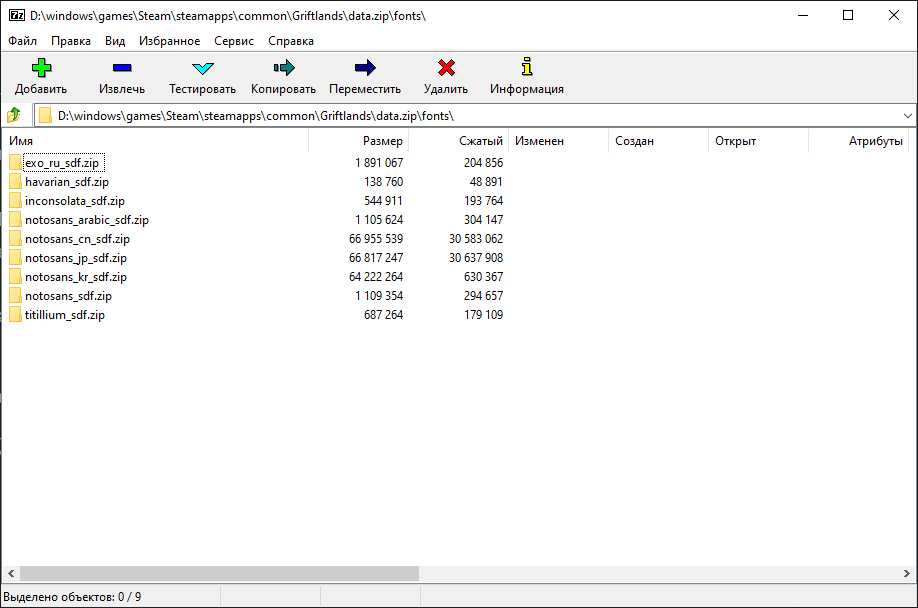
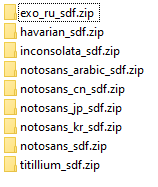
<p>Fonts themselves can be found in <code>Griftlands folder/data.zip/fonts</code>. Luckily, it&rsquo;s a simple .zip and it can be opened with any archiver.</p>
<figure><a href="https://thatcat.space/posts/griftlands-ru-font/game-archive-fonts.png" title="https://thatcat.space/posts/griftlands-ru-font/game-archive-fonts.png" >
        <img src="https://thatcat.space/posts/griftlands-ru-font/game-archive-fonts.png" alt="https://thatcat.space/posts/griftlands-ru-font/game-archive-fonts.png" />
    </a><blockquote class="image-caption">Font folders in game archive.</blockquote>
    </figure>
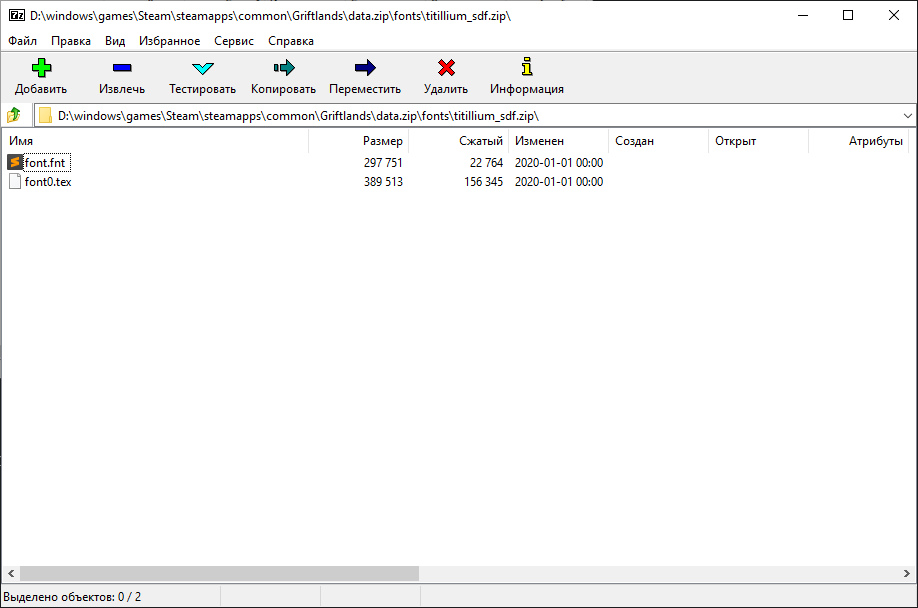
<p>Original uses the last one, Titillium. So, this the font we will extract.</p>
<figure><a href="https://thatcat.space/posts/griftlands-ru-font/game-archive-titillium.png" title="https://thatcat.space/posts/griftlands-ru-font/game-archive-titillium.png" >
        <img src="https://thatcat.space/posts/griftlands-ru-font/game-archive-titillium.png" alt="https://thatcat.space/posts/griftlands-ru-font/game-archive-titillium.png" />
    </a><blockquote class="image-caption">Every font needs two files: font.fnt and font0.tex.</blockquote>
    </figure>
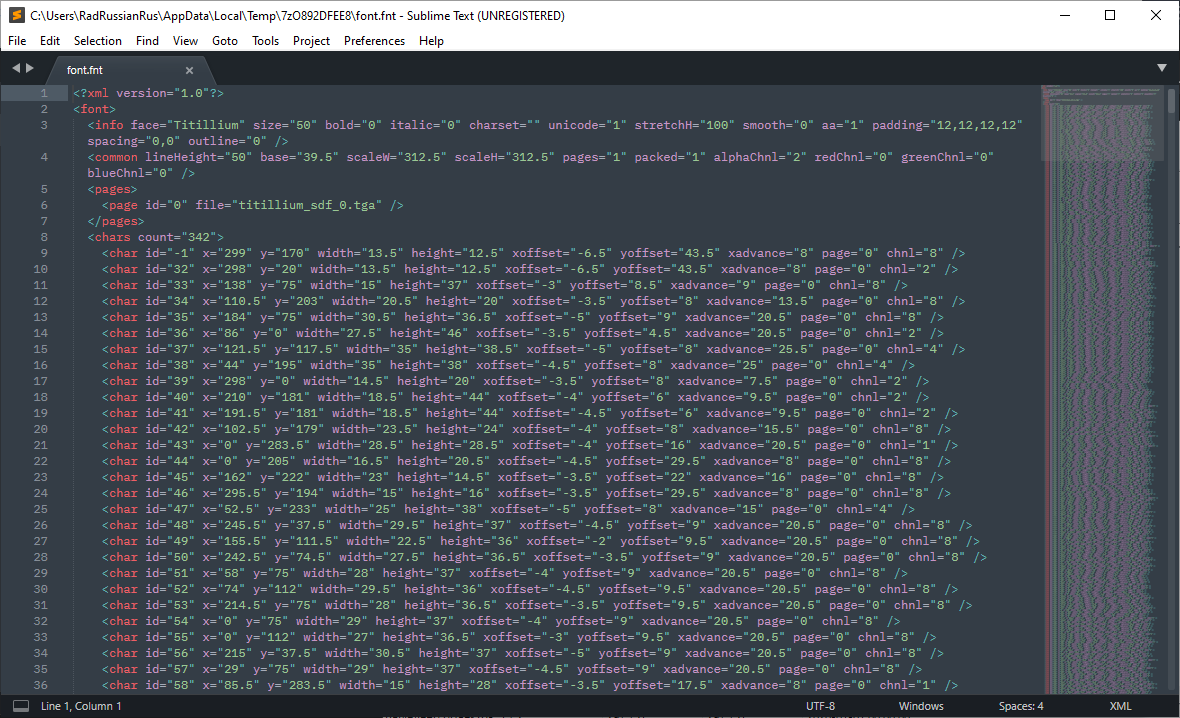
<p>This screenshot spoilers a little that this file can be opened in Sublime Text. As you can guess, it&rsquo;s a text file, or more specifically, XML.</p>
<figure><a href="https://thatcat.space/posts/griftlands-ru-font/fnt-file-sublime.png" title="https://thatcat.space/posts/griftlands-ru-font/fnt-file-sublime.png" >
        <img src="https://thatcat.space/posts/griftlands-ru-font/fnt-file-sublime.png" alt="https://thatcat.space/posts/griftlands-ru-font/fnt-file-sublime.png" />
    </a><blockquote class="image-caption">File font.fnt.</blockquote>
    </figure>
<p>But what to do with .tex file? Without thinking, I headed to Google search.</p>
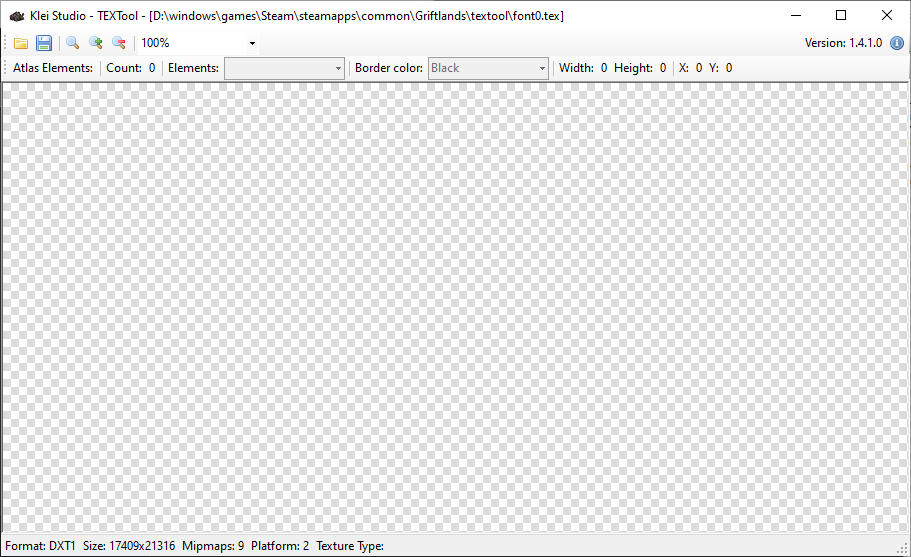
<p>At first I&rsquo;ve font <a href="https://forums.kleientertainment.com/files/file/73-handsome-matts-tools/" target="_blank" rel="noopener noreffer">.tex file tool for Don&rsquo;t Starve</a>
. But sadly, a blank screen was shown when I&rsquo;ve opened a file.</p>
<figure><a href="https://thatcat.space/posts/griftlands-ru-font/textool-attempt.png" title="https://thatcat.space/posts/griftlands-ru-font/textool-attempt.png" >
        <img src="https://thatcat.space/posts/griftlands-ru-font/textool-attempt.png" alt="https://thatcat.space/posts/griftlands-ru-font/textool-attempt.png" />
    </a><blockquote class="image-caption">Opened font texture in TEXTool. No error, but no texture either.</blockquote>
    </figure>
<p>Next thing I&rsquo;ve found is the way to export textures to PNG. In forum reply <a href="https://forums.kleientertainment.com/forums/topic/118472-how-to-export-tex-file-to-png-file/?tab=comments#comment-1340178" target="_blank" rel="noopener noreffer">a function code has been posted</a>
 but info about how to call it <a href="https://forums.kleientertainment.com/forums/topic/120141-grifting-through-the-files-aka-datamining/page/2/?tab=comments#comment-1355133" target="_blank" rel="noopener noreffer">I&rsquo;ve found later</a>
. In short:</p>
<ol>
<li><strong>Enable debug mode.</strong> For that you&rsquo;ll need to add <code>--debug</code> to game start parameters.</li>
<li><strong>Open in-game console.</strong> It can be done by hitting <code>Ctrl+~</code> (tilde).</li>
<li><strong>Call function from there.</strong> I did it by copy-pasting from text editor because it&rsquo;s faster and more convenient.</li>
</ol>
<p>After that texture will be saved in Griftlands folder to в <code>user folder/Appdata/Roaming/Klei/Griftlands/steam-***</code>.</p>
<p>Font extraction code looked like this:</p>
<pre>UIHelpers.SaveTextureAsPNG(
	engine.asset.Texture(&#34;fonts/titillium_sdf.zip/font0.tex&#34;),
	&#34;titillium&#34;)</pre><blockquote>
        <p><b>One-line version</b></p><p>Formatting was added for readablity sake, but it probably won&rsquo;t work in console, so if you want to test it in-game, it&rsquo;s better to use this one-line version:</p>
<pre>UIHelpers.SaveTextureAsPNG(engine.asset.Texture(&#34;fonts/titillium_sdf.zip/font0.tex&#34;), &#34;titillium&#34;)</pre></blockquote>
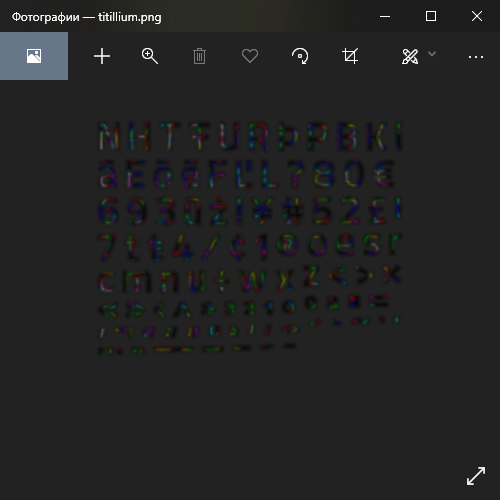
<p>Result came out&hellip; strange.</p>
<figure><a href="https://thatcat.space/posts/griftlands-ru-font/export-result.png" title="https://thatcat.space/posts/griftlands-ru-font/export-result.png" >
        <img src="https://thatcat.space/posts/griftlands-ru-font/export-result.png" alt="https://thatcat.space/posts/griftlands-ru-font/export-result.png" />
    </a><blockquote class="image-caption">Extracted version of Titillum font texture in PNG.</blockquote>
    </figure>
<p>Many questions arise momentarily:</p>
<ul>
<li>Why not symbols are here?</li>
<li>Why the font is blurry?</li>
<li>Why it&rsquo;s rainbow-colored?</li>
</ul>
<p>After that I&rsquo;ve tried to extract Russian font. It defintely should contain more symbols. Extraction code wasn&rsquo;t changed, only few arguments:</p>
<pre>UIHelpers.SaveTextureAsPNG(
	engine.asset.Texture(&#34;fonts/exo_ru_sdf.zip/font0.tex&#34;),
	&#34;exo&#34;)</pre><blockquote>
        <p><b>One-line version</b></p><p>Formatting was added for readablity sake, but it probably won&rsquo;t work in console, so if you want to test it in-game, it&rsquo;s better to use this one-line version:</p>
<pre>UIHelpers.SaveTextureAsPNG(engine.asset.Texture(&#34;fonts/exo_ru_sdf.zip/font0.tex&#34;), &#34;exo&#34;)</pre></blockquote>
<p>But result was the empty picture:</p>
<figure><a href="https://thatcat.space/posts/griftlands-ru-font/export-result-exo.png" title="https://thatcat.space/posts/griftlands-ru-font/export-result-exo.png" >
        <img src="https://thatcat.space/posts/griftlands-ru-font/export-result-exo.png" alt="https://thatcat.space/posts/griftlands-ru-font/export-result-exo.png" />
    </a><blockquote class="image-caption">Exracted version of Exo 2 font texture in PNG.</blockquote>
    </figure>
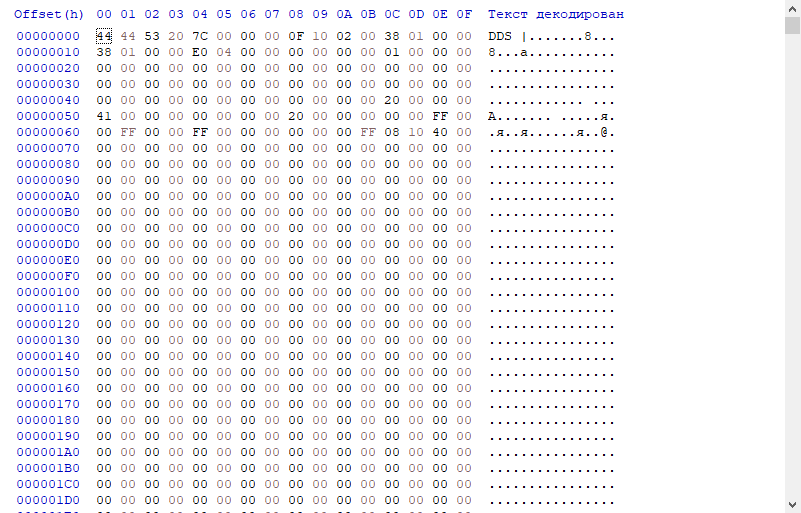
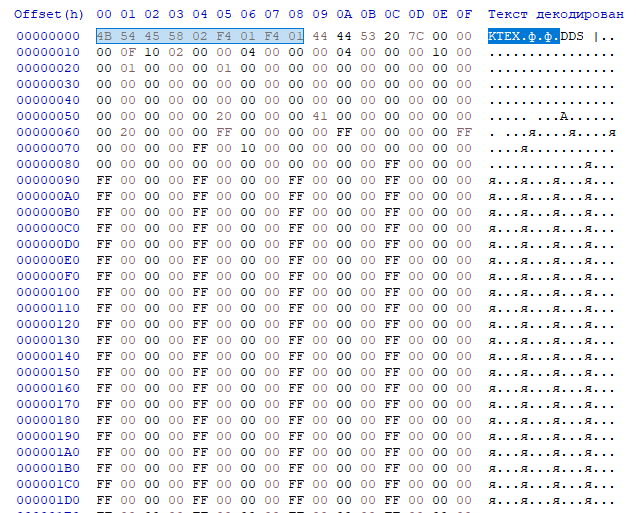
<p>Right away it&rsquo;s evident that something is lost during PNG export, so digging the format itself is required. That&rsquo;s why i&rsquo;ve opened it in hex editor and found an interesting thing.</p>
<figure><a href="https://thatcat.space/posts/griftlands-ru-font/ktex-hex.png" title="https://thatcat.space/posts/griftlands-ru-font/ktex-hex.png" >
        <img src="https://thatcat.space/posts/griftlands-ru-font/ktex-hex.png" alt="https://thatcat.space/posts/griftlands-ru-font/ktex-hex.png" />
    </a><blockquote class="image-caption">Opened file font0.tex in hex editor.</blockquote>
    </figure>
<p>First thing spotted is <code>DDS</code>. Could it really be DirectDraw Surface? Well, there is a simple way to check: just trim all bytes before it.</p>
<figure><a href="https://thatcat.space/posts/griftlands-ru-font/ktex-hex-clean.png" title="https://thatcat.space/posts/griftlands-ru-font/ktex-hex-clean.png" >
        <img src="https://thatcat.space/posts/griftlands-ru-font/ktex-hex-clean.png" alt="https://thatcat.space/posts/griftlands-ru-font/ktex-hex-clean.png" />
    </a><blockquote class="image-caption">Cleaned font0.tex file from first few bytes.</blockquote>
    </figure>
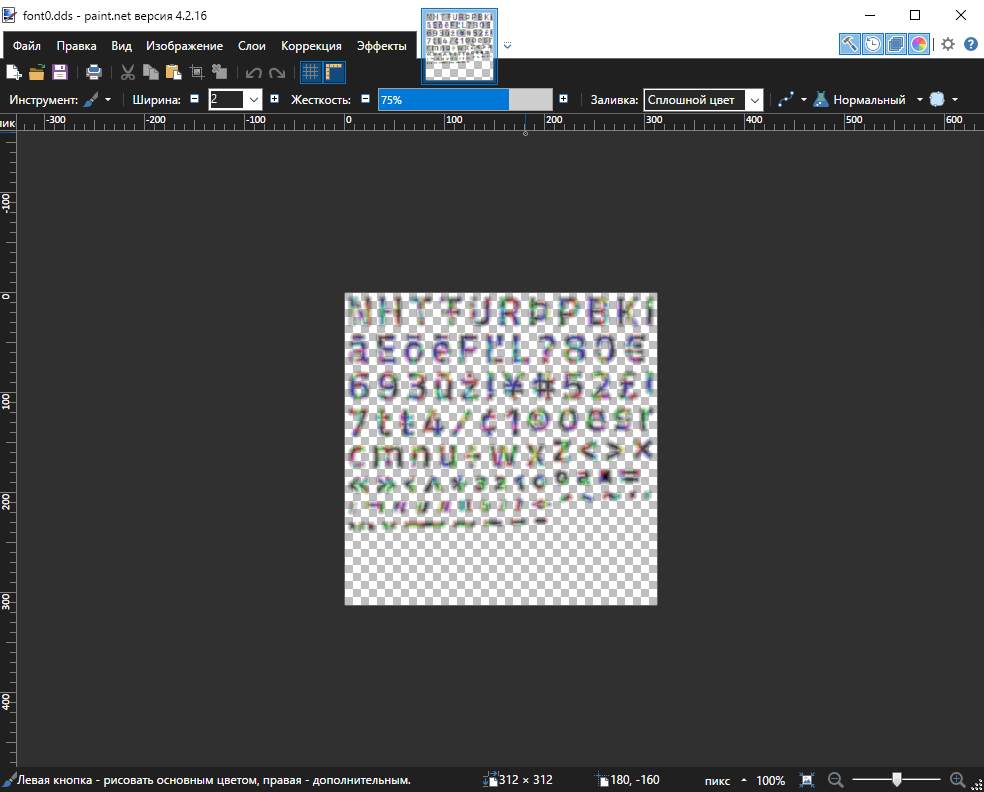
<p>And now is expectable question: how to open it? At first I&rsquo;ve tried Paint.net:</p>
<figure><a href="https://thatcat.space/posts/griftlands-ru-font/dds-paint-net.png" title="https://thatcat.space/posts/griftlands-ru-font/dds-paint-net.png" >
        <img src="https://thatcat.space/posts/griftlands-ru-font/dds-paint-net.png" alt="https://thatcat.space/posts/griftlands-ru-font/dds-paint-net.png" />
    </a><blockquote class="image-caption">Patched font0.tex file opened in Paint.net.</blockquote>
    </figure>
<p>My guess was correct: it <strong>is</strong> DirectDraw Surface. But there are still questions left: if it&rsquo;s the original DDS, then how it works?</p>
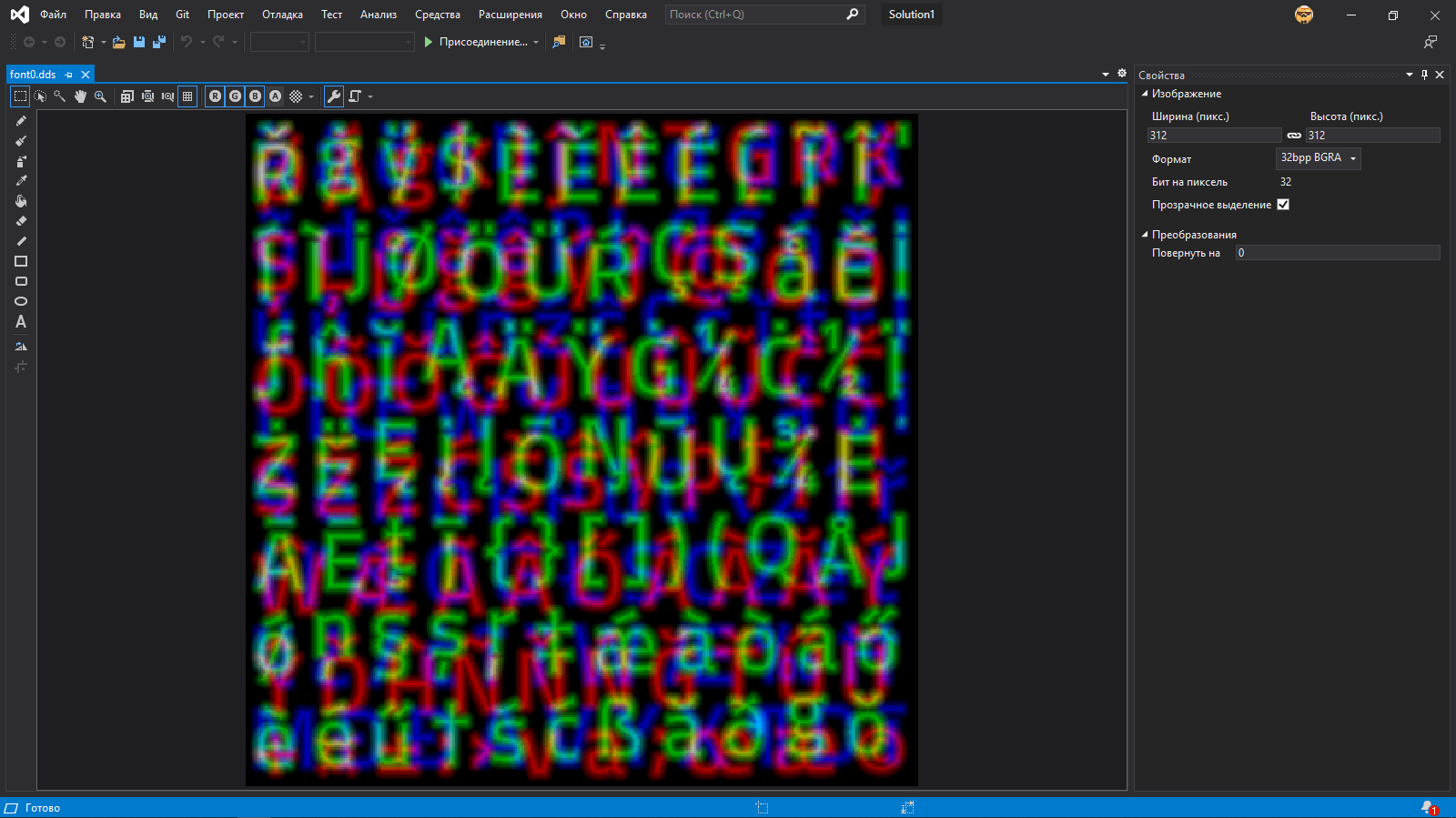
<p>I&rsquo;ve decided to search how else this file can be opened, and I&rsquo;ve found very unexpected option: Visual Studio.</p>
<figure><a href="https://thatcat.space/posts/griftlands-ru-font/dds-visual-studio.png" title="https://thatcat.space/posts/griftlands-ru-font/dds-visual-studio.png" >
        <img src="https://thatcat.space/posts/griftlands-ru-font/dds-visual-studio.png" alt="https://thatcat.space/posts/griftlands-ru-font/dds-visual-studio.png" />
    </a></figure>
<p>Eveything is same if not counting green background instead of checkered. But this was the place where I&rsquo;ve found out what&rsquo;s happening here.</p>
<p>Some time ago, when I was fiddling with Source engine textures with VTFEdit, they had alpha channel enabled by default. And commonly part of texture was hidden behind the same alpha channel. That&rsquo;s I&rsquo;ve decided to try: maybe it&rsquo;s the same story here? And disabled alpha channel.</p>
<figure><a href="https://thatcat.space/posts/griftlands-ru-font/dds-visual-studio-no-alpha.png" title="https://thatcat.space/posts/griftlands-ru-font/dds-visual-studio-no-alpha.png" >
        <img src="https://thatcat.space/posts/griftlands-ru-font/dds-visual-studio-no-alpha.png" alt="https://thatcat.space/posts/griftlands-ru-font/dds-visual-studio-no-alpha.png" />
    </a></figure>
<p><strong>Jackpot.</strong></p>
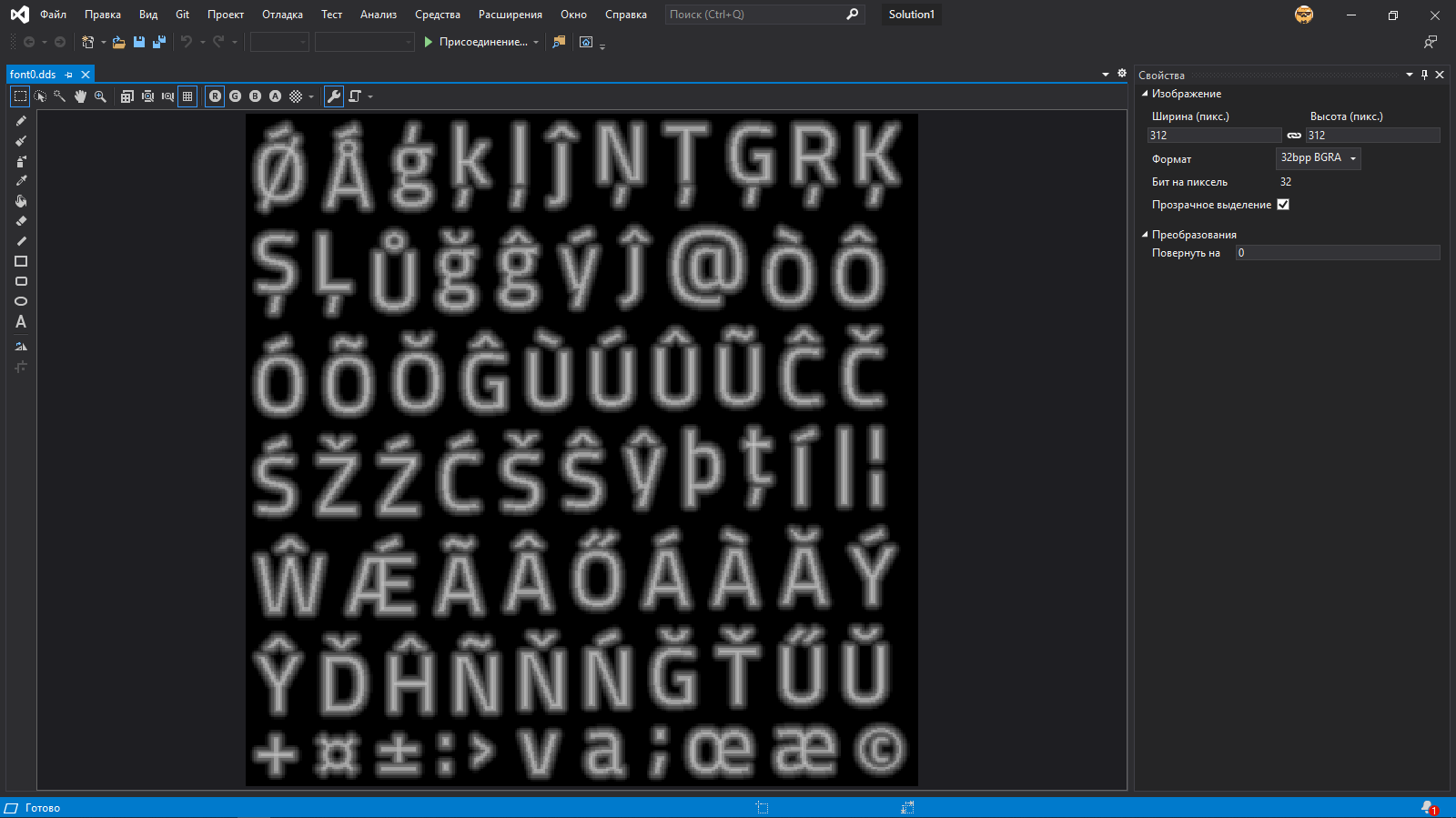
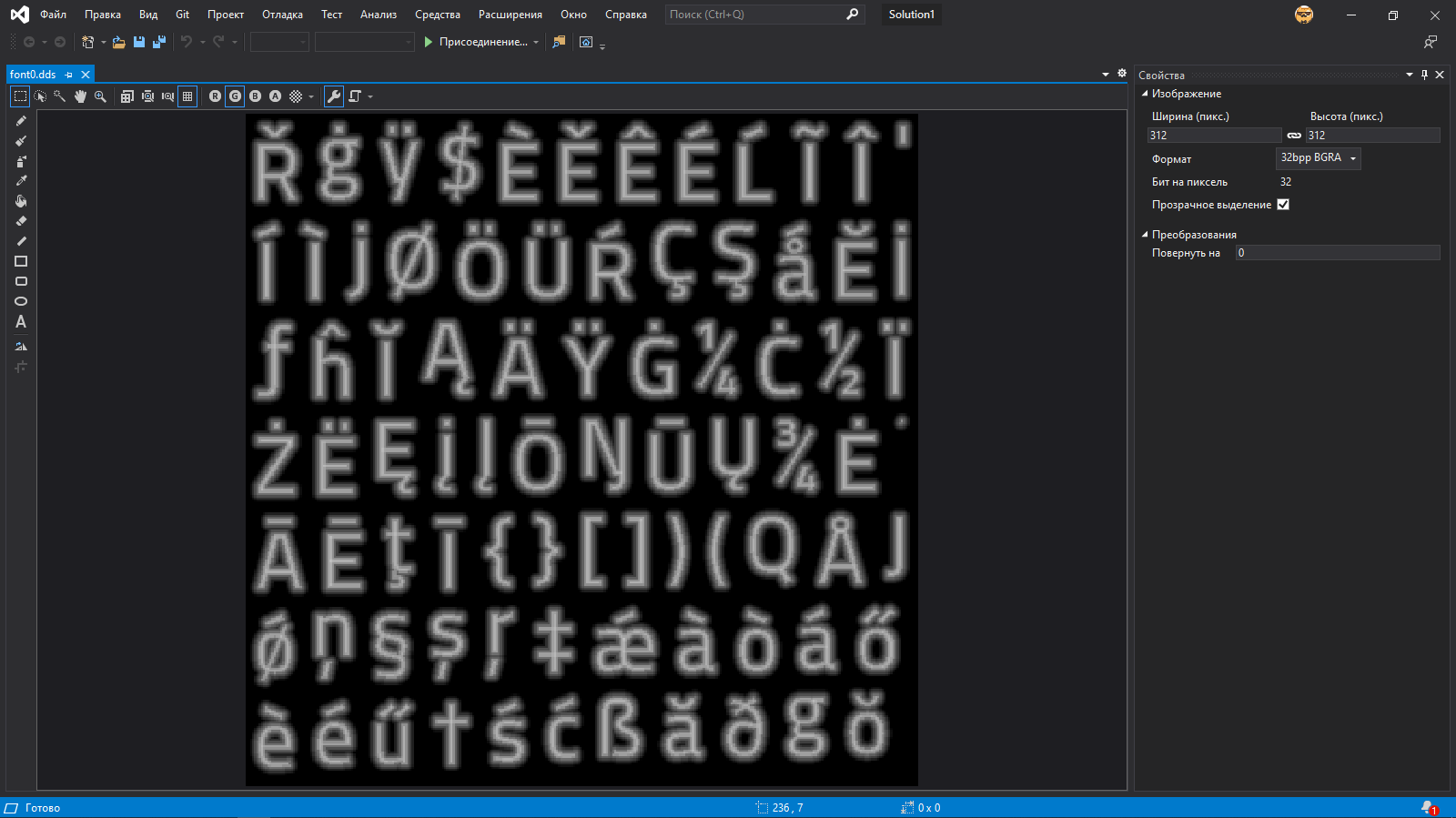
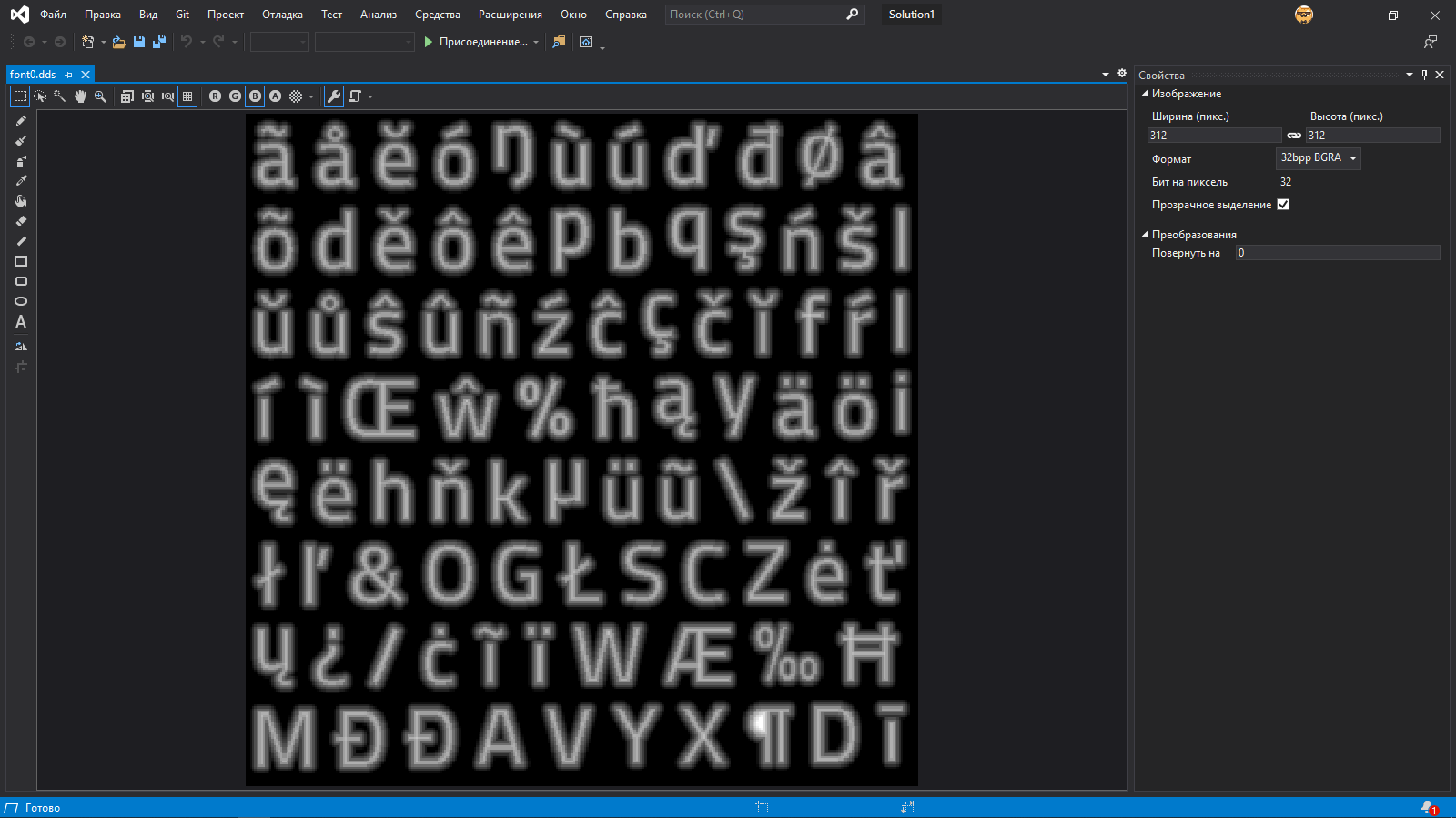
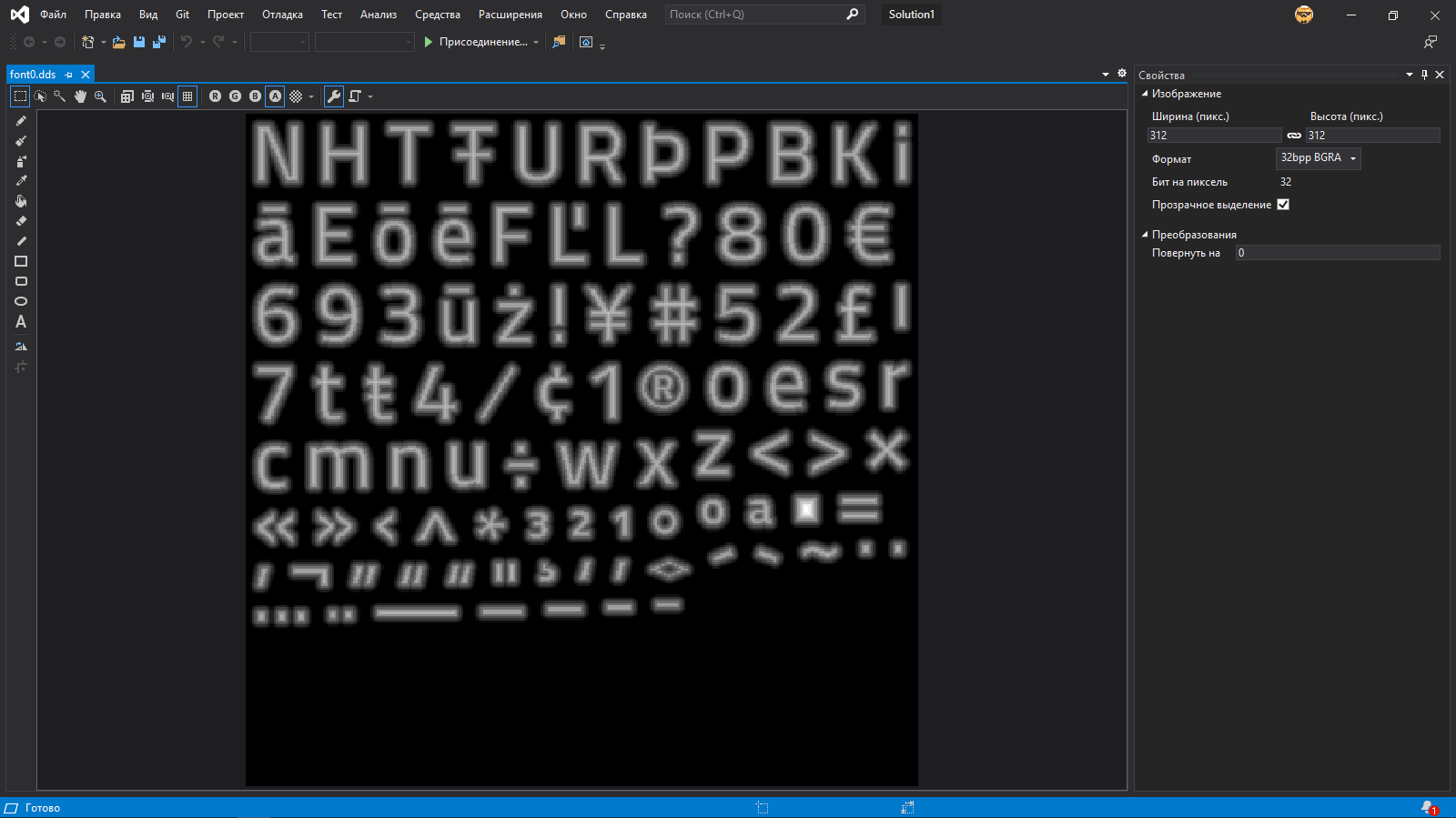
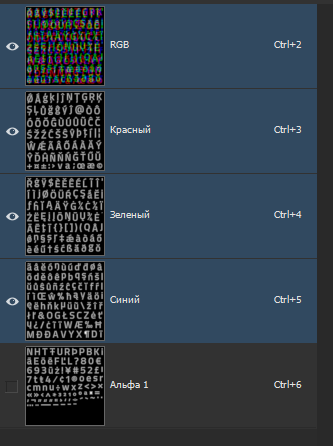
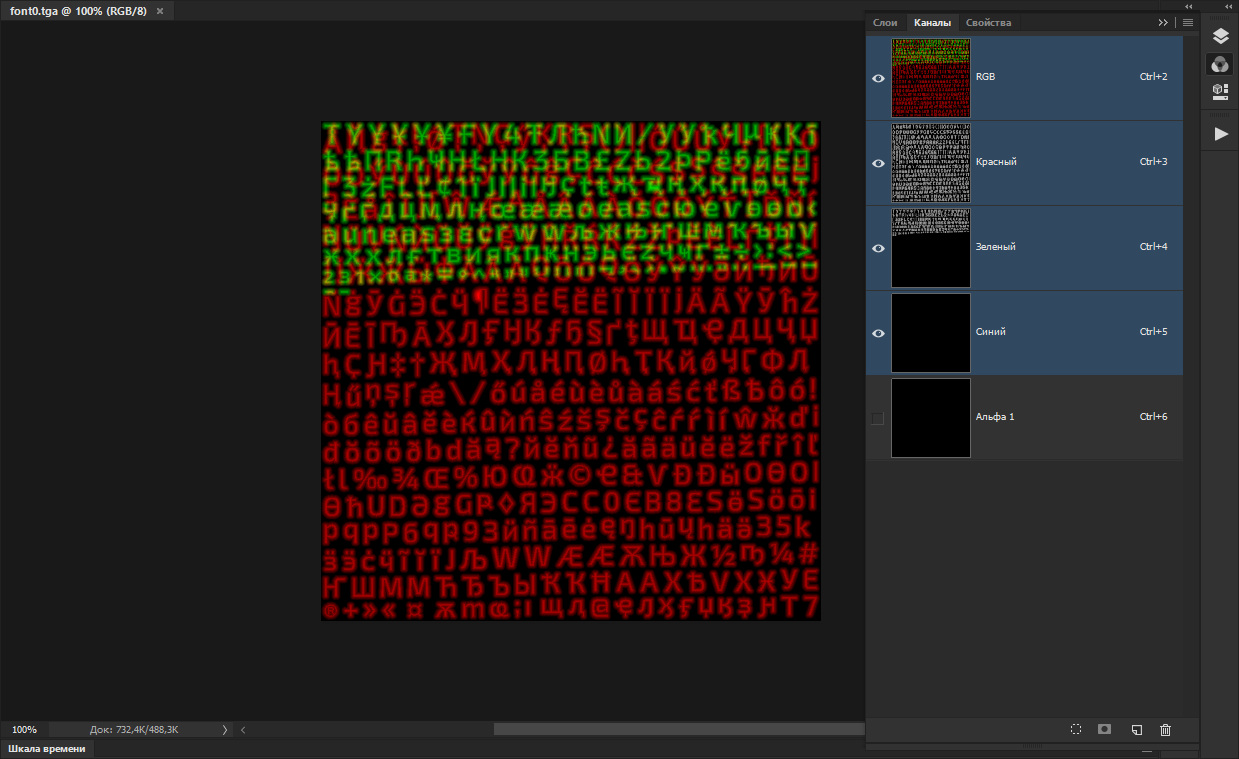
<p>Now it&rsquo;s all made clear: letters are packed in different channels.</p>
<p><figure><a href="https://thatcat.space/posts/griftlands-ru-font/dds-visual-studio-r.png" title="https://thatcat.space/posts/griftlands-ru-font/dds-visual-studio-r.png" >
        <img src="https://thatcat.space/posts/griftlands-ru-font/dds-visual-studio-r.png" alt="https://thatcat.space/posts/griftlands-ru-font/dds-visual-studio-r.png" />
    </a></figure> <figure><a href="https://thatcat.space/posts/griftlands-ru-font/dds-visual-studio-g.png" title="https://thatcat.space/posts/griftlands-ru-font/dds-visual-studio-g.png" >
         <img src="https://thatcat.space/posts/griftlands-ru-font/dds-visual-studio-g.png" alt="https://thatcat.space/posts/griftlands-ru-font/dds-visual-studio-g.png" />
     </a></figure><br>
<figure><a href="https://thatcat.space/posts/griftlands-ru-font/dds-visual-studio-b.png" title="https://thatcat.space/posts/griftlands-ru-font/dds-visual-studio-b.png" >
        <img src="https://thatcat.space/posts/griftlands-ru-font/dds-visual-studio-b.png" alt="https://thatcat.space/posts/griftlands-ru-font/dds-visual-studio-b.png" />
    </a></figure> <figure><a href="https://thatcat.space/posts/griftlands-ru-font/dds-visual-studio-a.png" title="https://thatcat.space/posts/griftlands-ru-font/dds-visual-studio-a.png" >
         <img src="https://thatcat.space/posts/griftlands-ru-font/dds-visual-studio-a.png" alt="https://thatcat.space/posts/griftlands-ru-font/dds-visual-studio-a.png" />
     </a></figure></p>
<p>It&rsquo;s clear now why only some symbols were shown and why they were rainbow-colored.</p>
<p>After that I&rsquo;ve easily managed to convert it to TGA: it can be done in the very same Visual Studio. Why TGA? Just because it .fnt file said that.</p>
<blockquote>
<p>By the way, as I&rsquo;ve found out later, Paint.net also can convert DDS to TGA. So it&rsquo;s a possible alternative if you don&rsquo;t want to to install Visual Studio. But I&rsquo;m sure there are other ways to do it.</p>
</blockquote>
<figure><a href="https://thatcat.space/posts/griftlands-ru-font/tga-photoshop.png" title="https://thatcat.space/posts/griftlands-ru-font/tga-photoshop.png" >
        <img src="https://thatcat.space/posts/griftlands-ru-font/tga-photoshop.png" alt="https://thatcat.space/posts/griftlands-ru-font/tga-photoshop.png" />
    </a></figure>
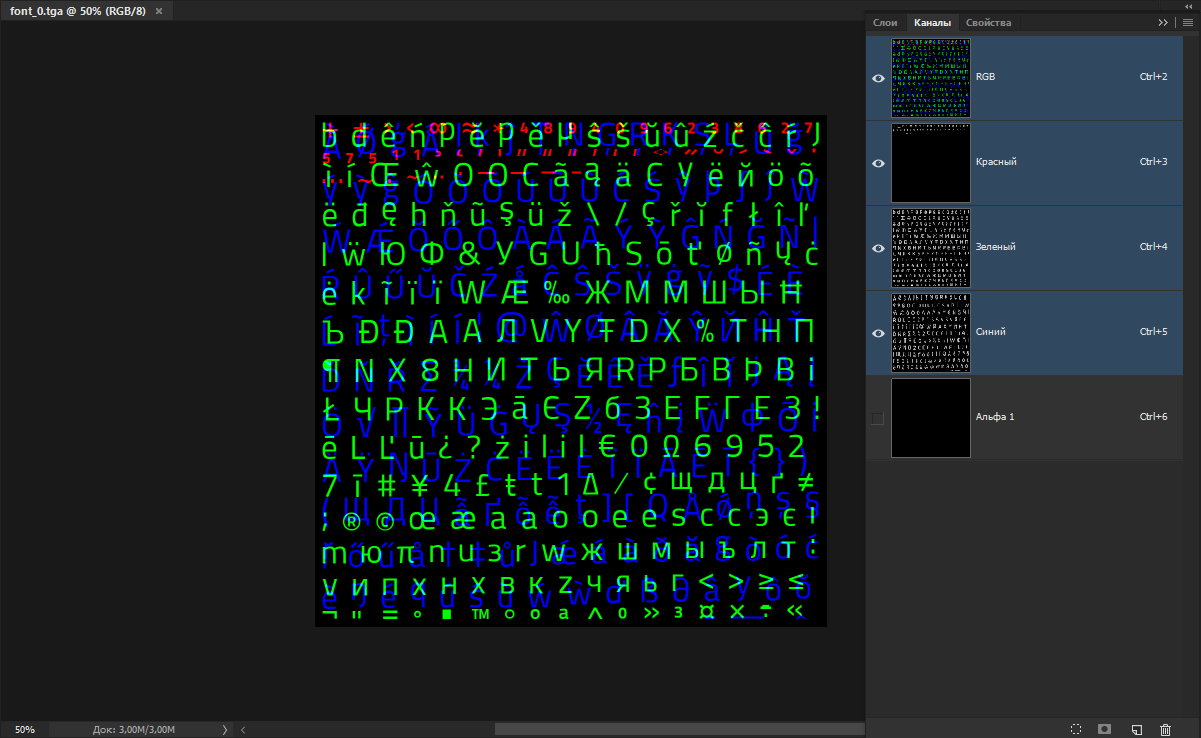
<p>Converted TGA works perfectly in Adobe Photoshop.</p>
<p>Then I&rsquo;ve got curious how in-game Exo 2 looks.</p>
<figure><a href="https://thatcat.space/posts/griftlands-ru-font/exo-tga-photoshop.png" title="https://thatcat.space/posts/griftlands-ru-font/exo-tga-photoshop.png" >
        <img src="https://thatcat.space/posts/griftlands-ru-font/exo-tga-photoshop.png" alt="https://thatcat.space/posts/griftlands-ru-font/exo-tga-photoshop.png" />
    </a></figure>
<p>Mostly the same, but it uses bigger texture and about 1.3 of channel is used in total. But mostly it looks the same.</p>
<p>Well, I&rsquo;ve found the way to extract, now I need to find to create my own and pack it.</p>
<p>But there is still one question left unsolved.</p>
<h2 id="replacing-of-extracted-font">Replacing of extracted font</h2>
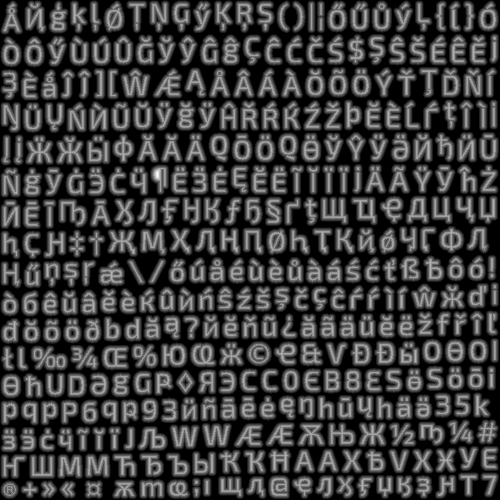
<p>As you can see, texture font is&hellip; a bit blurry. Not sure what&rsquo;s the glowing border around it.</p>
<figure><a href="https://thatcat.space/posts/griftlands-ru-font/font-channel.png" title="https://thatcat.space/posts/griftlands-ru-font/font-channel.png" >
        <img src="https://thatcat.space/posts/griftlands-ru-font/font-channel.png" alt="https://thatcat.space/posts/griftlands-ru-font/font-channel.png" />
    </a></figure>
<p>But luckily there is a hint right in font names.</p>
<figure><a href="https://thatcat.space/posts/griftlands-ru-font/archive-folders.png" title="https://thatcat.space/posts/griftlands-ru-font/archive-folders.png" >
        <img src="https://thatcat.space/posts/griftlands-ru-font/archive-folders.png" alt="https://thatcat.space/posts/griftlands-ru-font/archive-folders.png" />
    </a></figure>
<p>Yes, you&rsquo;ve got it correctly, we&rsquo;re talking about SDF.</p>
<p>Without thinking I&rsquo;ve started to search any information about it. And i&rsquo;ve found out this article: <a href="https://habr.com/ru/post/282191/" target="_blank" rel="noopener noreffer">UTF-8 text rendering with SDF font (in Russian)</a>
.</p>
<p>Not sure if there is an equal material or a translation of it on English, but I&rsquo;m not going to tell what&rsquo;s the SDF here. But here are the things from it that helped me:</p>
<ol>
<li><strong><a href="https://www.angelcode.com/products/bmfont/" target="_blank" rel="noopener noreffer">BMFont</a>
 software.</strong> This app allows to generate bitmap font. Instruction in article wasn&rsquo;t written for it, so I had to pick settings myself. Maybe <a href="https://github.com/scriptum/UBFG" target="_blank" rel="noopener noreffer">UBFG</a>
 would be easier, but I decided to avoid building.</li>
<li><strong>ImageMagick command.</strong> To get the result I need I&rsquo;ve played with paramters a little.</li>
</ol>
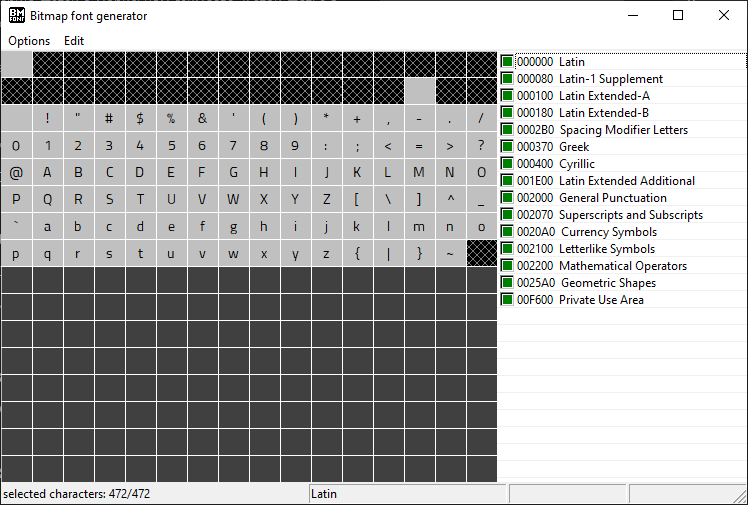
<p>First I&rsquo;ve installed the font (since loading from file didn&rsquo;t work) and opened it in BMFont. Also I&rsquo;ve immediately selected all symbol groups that were there.</p>
<figure><a href="https://thatcat.space/posts/griftlands-ru-font/bmfont-titillium-rus.png" title="https://thatcat.space/posts/griftlands-ru-font/bmfont-titillium-rus.png" >
        <img src="https://thatcat.space/posts/griftlands-ru-font/bmfont-titillium-rus.png" alt="https://thatcat.space/posts/griftlands-ru-font/bmfont-titillium-rus.png" />
    </a></figure>
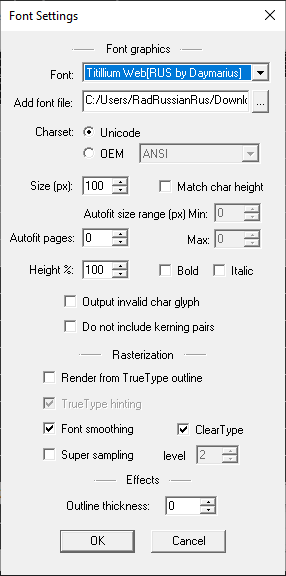
<p>Font settings turned out to be easy: changed only the font itself and size. Font size was adjusted to approximate texture size though.</p>
<figure><a href="https://thatcat.space/posts/griftlands-ru-font/bmfont-font-settings.png" title="https://thatcat.space/posts/griftlands-ru-font/bmfont-font-settings.png" >
        <img src="https://thatcat.space/posts/griftlands-ru-font/bmfont-font-settings.png" alt="https://thatcat.space/posts/griftlands-ru-font/bmfont-font-settings.png" />
    </a></figure>
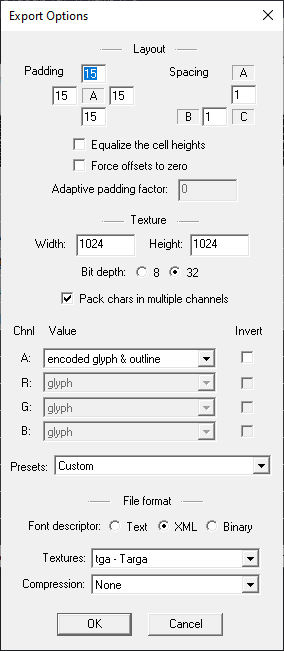
<p>But export settings were a little pain, but in the end I&rsquo;ve chosen something like this:</p>
<figure><a href="https://thatcat.space/posts/griftlands-ru-font/bmfont-export-options.png" title="https://thatcat.space/posts/griftlands-ru-font/bmfont-export-options.png" >
        <img src="https://thatcat.space/posts/griftlands-ru-font/bmfont-export-options.png" alt="https://thatcat.space/posts/griftlands-ru-font/bmfont-export-options.png" />
    </a></figure>
<p>Important things here:</p>
<ul>
<li><strong>Padding</strong> sets the padding from from symbol. It should be big enough since SDF border is not taken into account when generating.</li>
<li><strong>Texture width</strong> and <strong>texture height</strong>. I&rsquo;ve tried to pick the size that will be not too big but can fit all symbols. Moreover, I&rsquo;ve tried to not touch alpha channel.</li>
<li><strong>Pack chars into multiple channels.</strong> It allows to generate same font textures like in the game: packed in different channels.</li>
<li><strong>Chnl</strong> and <strong>Value</strong>. Here I&rsquo;ve decided to pick the same values like in original: <strong>encoded glyph &amp; outline</strong> is 2 (set for alpha channel in original font) and <strong>glyph</strong> is 0 (set for other channels).</li>
</ul>
<p>But here&rsquo;s the problem. The thing is that if <strong>Pack into multiple channels</strong> is checked then you can change either preset or alpha channel. In this case you can do the following:</p>
<ol>
<li>Choose in Presets &ldquo;White text on black (no alpha)&rdquo;.</li>
<li>Set alpha channel to <strong>encoded glyph &amp; outline</strong> instead of <strong>one</strong>.</li>
</ol>
<p>And of course I&rsquo;ve set Targa without RLE compression as type and XML as Font Descriptor.</p>
<blockquote>
        <p><b>Note</b></p>You can pick different settings that could be even better. For example, on my second try I&rsquo;ve noticed that it has direct extraction to DDS. But after the export I&rsquo;ve caught a new problem so testing is required.</blockquote>
<p>You can see the resulted font in <code>Options &gt; Visualize</code> beforehand, but since the color is too eye-hurting (it&rsquo;s bright red!), I&rsquo;ll better show export result:</p>
<figure><a href="https://thatcat.space/posts/griftlands-ru-font/bmfont-export-result.png" title="https://thatcat.space/posts/griftlands-ru-font/bmfont-export-result.png" >
        <img src="https://thatcat.space/posts/griftlands-ru-font/bmfont-export-result.png" alt="https://thatcat.space/posts/griftlands-ru-font/bmfont-export-result.png" />
    </a></figure>
<p>Now only thing left is to make it an SDF. For that I&rsquo;ve used the following command from the article:</p>
<pre>convert font.png ^
	-filter Jinc ^
	( &#43;clone -negate -morphology Distance Euclidean -level 50%,-50% ) ^
	-morphology Distance Euclidean ^
	-compose Plus ^
	-composite ^
	-level 43%,57% ^
	-resize 12.5% ^
	font.png</pre><p>I&rsquo;ve used newer version of ImageMagick and adjusted some values, so it&rsquo;s ended like this:</p>
<pre>magick font.png ^
	-filter Jinc ^
	( &#43;clone -negate -morphology Distance Euclidean -level 50%,-50% ) ^
	-morphology Distance Euclidean ^
	-compose Plus ^
	-composite ^
	-level 42%,58% ^
	font.png</pre><blockquote>
        <p><b>Few words about formatting</b></p><p>I&rsquo;ve split the command to multiple lines for readability sake and since all things from article were done on Windows, its command line splitting is used. However, there is nothing specific for Windows&rsquo; command line, so it can be easily adapted to Bash by simply replacing <code>^</code> to <code>\</code>:</p>
<pre>convert font.png \
	-filter Jinc \
	( &#43;clone -negate -morphology Distance Euclidean -level 50%,-50% ) \
	-morphology Distance Euclidean \
	-compose Plus \
	-composite \
	-level 43%,57% \
	-resize 12.5% \
	font.png</pre><pre>magick font.png \
	-filter Jinc \
	( &#43;clone -negate -morphology Distance Euclidean -level 50%,-50% ) \
	-morphology Distance Euclidean \
	-compose Plus \
	-composite \
	-level 42%,58% \
	font.png</pre><p>Or it can be written in one line which should work in both shells:</p>
<pre>convert font.png -filter Jinc ( &#43;clone -negate -morphology Distance Euclidean -level 50%,-50% ) -morphology Distance Euclidean -compose Plus -composite -level 43%,57% -resize 12.5% font.png</pre><pre>magick font.png -filter Jinc ( &#43;clone -negate -morphology Distance Euclidean -level 50%,-50% ) -morphology Distance Euclidean -compose Plus -composite -level 42%,58% font.png</pre></blockquote>
<p>But if you&rsquo;ll try to convert TGA that way, the result will be an empty file. The thing is that filter must be applied to each channel seprately. I haven&rsquo;t understood how to apply filter to channel in ImageMagick yet, but before it&rsquo;s done it&rsquo;s easier to save channels manually and process them, and then glue them back together.</p>
<p>That was the result:</p>
<figure><a href="https://thatcat.space/posts/griftlands-ru-font/exported-sdf.png" title="https://thatcat.space/posts/griftlands-ru-font/exported-sdf.png" >
        <img src="https://thatcat.space/posts/griftlands-ru-font/exported-sdf.png" alt="https://thatcat.space/posts/griftlands-ru-font/exported-sdf.png" />
    </a></figure>
<p>Just what I needed. Now I need to convert to TEX, but how?</p>
<p>As I wrote eariler, TEX is a DDS with its own header. So I just need to convert TGA to DDS and add necessary bytes.</p>
<figure><a href="https://thatcat.space/posts/griftlands-ru-font/dds-ktex-bytes.png" title="https://thatcat.space/posts/griftlands-ru-font/dds-ktex-bytes.png" >
        <img src="https://thatcat.space/posts/griftlands-ru-font/dds-ktex-bytes.png" alt="https://thatcat.space/posts/griftlands-ru-font/dds-ktex-bytes.png" />
    </a></figure>
<blockquote>
        <p><b>Update</b></p>By pure accident I figured out that neither TEX bytes nor DDS conversion aren&rsquo;t needed. Renaming TGA file to <code>font0.tex</code> and putting in right folder is enough.</blockquote>
<p>All done, now you can include the font in mod and test it in-game. But there was a surprise waiting for me.</p>
<figure><a href="https://thatcat.space/posts/griftlands-ru-font/griftlands-garbled-font.jpg" title="https://thatcat.space/posts/griftlands-ru-font/griftlands-garbled-font.jpg" >
        <img src="https://thatcat.space/posts/griftlands-ru-font/griftlands-garbled-font.jpg" alt="https://thatcat.space/posts/griftlands-ru-font/griftlands-garbled-font.jpg" />
    </a><blockquote class="image-caption">A small note: this screenshot is from old version when I was experimenting with texture sizes, so it was packed in other way. With current settings it could look different but the point still stands.</blockquote>
    </figure>
<p>Most of the text became totally unreadable. But some letters are shown correctly. What&rsquo;s wrong?</p>
<p>As it turned out, only green channel was shown correctly. After swapping red and blue channels and re-packing everything started to work as expected.</p>
<figure><a href="https://thatcat.space/posts/griftlands-ru-font/griftlands-fixed-font.jpg" title="https://thatcat.space/posts/griftlands-ru-font/griftlands-fixed-font.jpg" >
        <img src="https://thatcat.space/posts/griftlands-ru-font/griftlands-fixed-font.jpg" alt="https://thatcat.space/posts/griftlands-ru-font/griftlands-fixed-font.jpg" />
    </a></figure>
<h2 id="few-closing-words">Few closing words</h2>
<p>It&rsquo;s kinda hard to change the font in Griftlands currently. Maybe there will be people that will write specialized programs for that. I&rsquo;m planning to write a proper guide with better commands and easier generation options.</p>
<p>Regarding Russian translation, I&rsquo;ve planned to fix its mistakes because they weren&rsquo;t fixed after Griftlands left the early access. But nobody knows when that happen. Even me. But I hope it will.</p>
<p>By the way, you can use the font in-game through this mod:</p>
<blockquote>
    <p><b><a href="https://steamcommunity.com/sharedfiles/filedetails/?id=2502683425"  target="_blank" rel="noopener noreffer">Titillium (Russian)</a></b></p>
    <p>This mod adds Russian version of Titillium font.</p>
    <p><i>Steam Workshop | Griftlands</i></p>
</blockquote>

<p>Note that to get it to work, you need the Font Switcher:</p>
<blockquote>
    <p><b><a href="https://steamcommunity.com/sharedfiles/filedetails/?id=2502792029"  target="_blank" rel="noopener noreffer">Font Switcher</a></b></p>
    <p>This mod allows to change font for game texts. It doesn&#39;t add new fonts, and just uses ones the game already have.</p>
    <p><i>Steam Workshop | Griftlands</i></p>
</blockquote>

]]></content>
        </entry>
</feed>